How many kilos will greenhouse 2 give over the next three weeks? I walked row 14 this morning.
Yield estimation & forecast
Walk the aisle, know what's on the plants. DeepLeaf Yield turns a phone video of a tomato row into fruit counts by ripeness, plants and sizes, then forecasts the harvest for this week and the weeks after.
- Crop
- Greenhouse tomato
- Input
- Phone video or photos of a row
- Ripeness
- Green, turning, red
- Forecast
- Kilograms per week, with a range
From a walk to a forecast
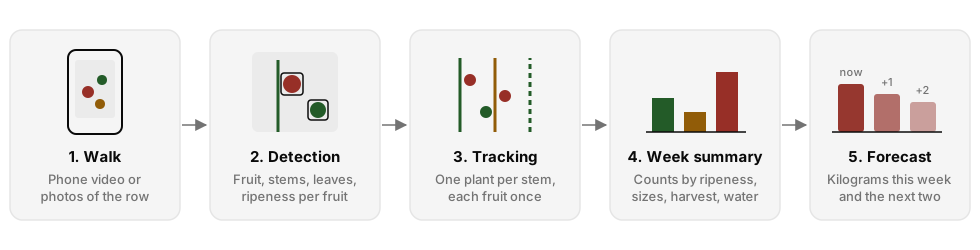
- Film with the live guide
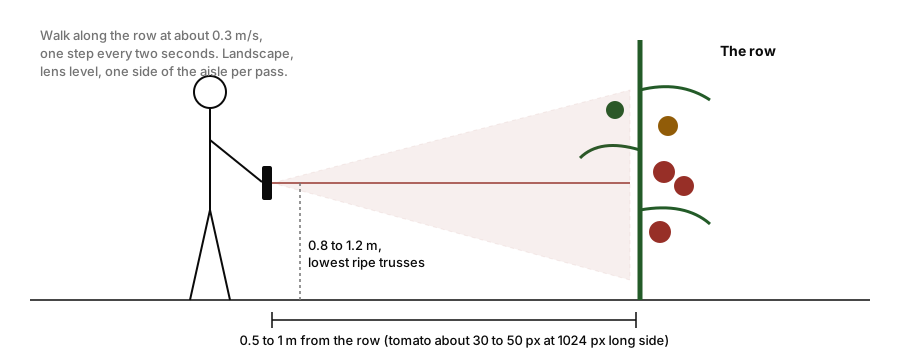
- Walk one side of the aisle at the height of the lowest ripe trusses. About once a second the app says move closer, step back, hold steady, or good.
- Upload one clip or several
- Save the walk to a crop cycle and a week. A long aisle can go up as up to 12 clips, scored and counted as one walk.
- Check the capture
- Every walk opens with a capture check: too far, too close, or blurry, so you know how much to trust it.
- Log the harvest
- Harvest kilograms turn fruit counts into kilograms, and each week's harvest checks the forecast issued the week before.
What a walk scores
- Fruit and stem masks, leaf pixels, and a ripeness class (green, turning or red) on every fruit large enough to read.
- One plant per stem line. Each fruit stays with the stem that reaches it from above, and is counted once.
- Sizes in millimetres when a printed calibration board is in the frame, or from a number you type.
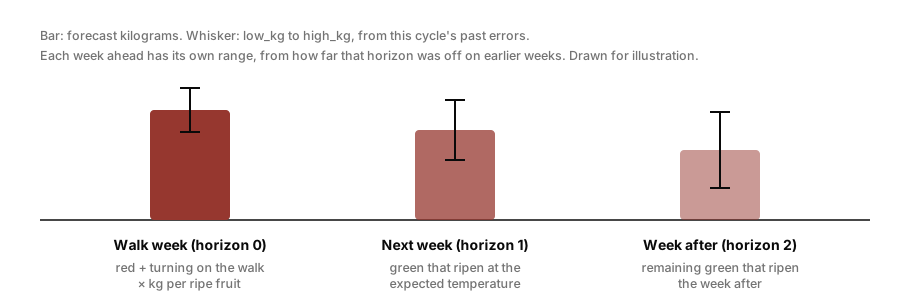
- Red and turning fruit are the visible pick; green fruit carry the weeks ahead.
Forecast horizons
- Input
- Walk of row 14 · 3 clips · 4 min 12 s
- Output
- 412 plants · 3,980 fruit: 610 red, 540 turning, 2,830 green · capture check good
About 2,870 kg over the next three weeks.
- Walk
- Row 14, today 07:40
- Fruit counted
- 3,980 on 412 plants
- Kg per fruit
- 0.118, learned from 9 harvests
| Horizon | Forecast (kg) | Range (kg) | From |
|---|---|---|---|
| This week | 1,020 | 930–1,110 | Red and turning |
| Next week | 980 | 840–1,120 | Green, ripening |
| Week after | 870 | 690–1,050 | Remaining green |
Plan pickers for about 1,000 kg this week. The range widens further out because those fruit are still green; log Friday's harvest and the forecast will check itself against it.
This week's forecast comes from the ripe fruit on the walk. The weeks after come from green fruit ripening at the expected greenhouse temperature, built from the outdoor weather forecast for the greenhouse and the measured indoor climate. When a walk is missing, the harvest history carries the forecast.
Kilograms per fruit are learned from the harvests you log. Each horizon is checked against the harvest that followed, and the backtest is shown next to simply repeating last week, so you can see whether the model earns its place.
Records and corrections
- Registry
- Farms, greenhouses, rows and crop cycles, with harvests, irrigation, climate files and weather. Export to CSV.
- Climate import
- CSV exports from a climate computer or sensor logger, with column and unit detection and a preview before import.
- Water productivity
- Harvest kilograms per cubic metre of irrigation, week by week.
- Grower corrections
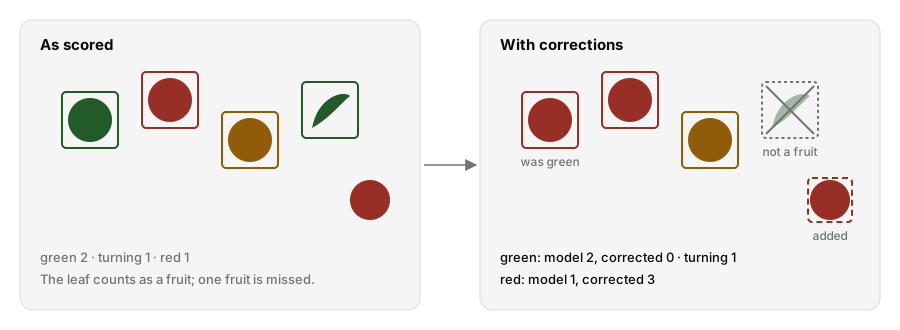
- Fix a fruit's ripeness, remove a false fruit, add a missed one, or type whole-walk totals. The forecast reads the corrected counts; the model's own counts are kept.
What you need
- A phone that records video. 4K helps with cherry tomatoes.
- A web browser on a phone, tablet or computer. DeepLeaf hosts the models, the data and the weather.
- Optional: a printed 5 × 7 calibration board with 40 mm squares, for sizes in millimetres.
Limits
Close-range footage overcounts, so follow the filming guide; the capture check warns when fruit fill too much of the frame. The ripening forecast has not yet been validated on a full real season. Accuracy published so far was measured on other growers' greenhouses and labels, so treat it as a starting point. Once you log harvests, the accuracy report measures the forecast on your own greenhouses.
For developers
Yield has its own API, with client libraries in TypeScript, Python and Dart for greenhouses and crop cycles, harvest and climate imports, walk uploads, forecasts and backtests. They are not on the public registries yet; DeepLeaf shares the package files with your keys.